• Home
  • Create an Account
  • My Account
  • Submit a Ticket
  • Knowledge Based
  • Contact us
Edit
  • Popular Post
  • Flick Office
  • Flick CMS
  • Flick Mail
  • Domain and Hosting Transfer
  • Website
  • Property Management for Landlords
  • Flick Portal
Navigation

Email Hosting

  • Open Your Hosting Package
  • Add a New Email Account
  • Login to Webmail
  • Reset an Email Password
  • Create an Email Forwarder
  • Manage an Existing Mailbox
  • View Email Account Setup
  • Create Flick Mail Email Signature
  • Set up Email on Android Devices
  • Set up Email on iPhone
  • Set up Outlook Mailbox
  • Email Sending Limitations

Email Hosting

  • Open Your Hosting Package
  • Add a New Email Account
  • Login to Webmail
  • Reset an Email Password
  • Create an Email Forwarder
  • Manage an Existing Mailbox
  • View Email Account Setup
  • Create Flick Mail Email Signature
  • Set up Email on Android Devices
  • Set up Email on iPhone
  • Set up Outlook Mailbox
  • Email Sending Limitations

Create an Email Forwarder

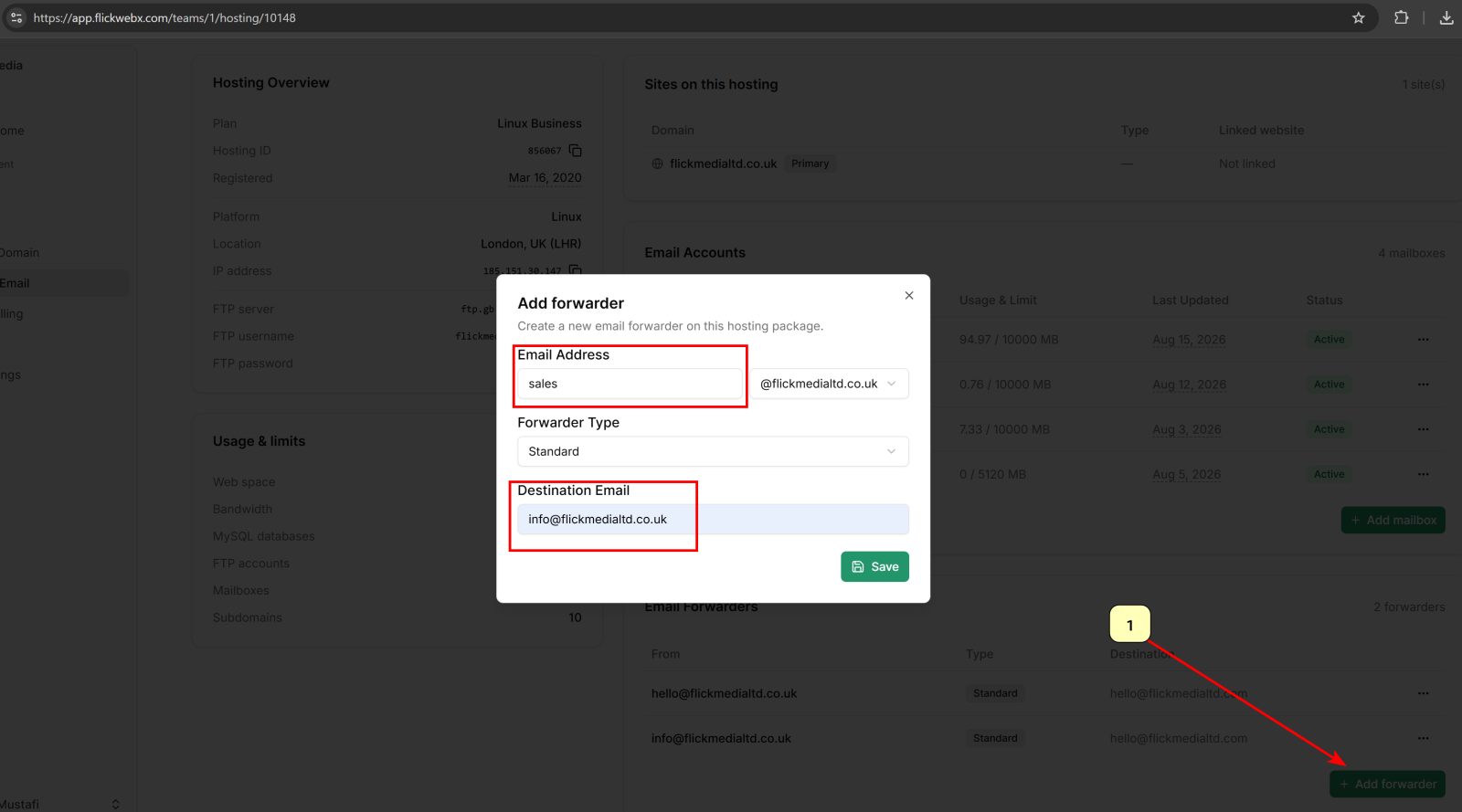
  1. Scroll to the Email Forwarders section.
  2. Click Add Forwarder.
  3. Enter the mailbox name (e.g. info).
  4. Select the forwarder type.
  5. Enter the destination email address (e.g. hello@gmail.com).
  6. Click Save.

Example

  1. From: info@yourdomain.com
  2. Forward To: hello@gmail.com

Related Articles:

  • Open Your Hosting Package
  • Add a New Email Account
  • Login to Webmail
  • Reset an Email Password
  • Create an Email Forwarder
  • Manage an Existing Mailbox
  • View Email Account Setup
  • Create Flick Mail Email Signature
  • Set up Email on Android Devices
  • Set up Email on iPhone
  • Set up Outlook Mailbox
  • Email Sending Limitations

Copyright © 2026 Flick Media Ltd. All rights reserved. | Powered By: Flick Media

We value your privacy

We store and/or access information on a device, such as cookies and process personal data, such as unique identifiers and standard information sent by a device for personalised ads and content, ad and content measurement, and audience insights, as well as to develop and improve products.

Find out more.

AGREE